
Blog

Key takeaways:
Ask five people what no code software development means and you will get five answers, most of them borrowed from a vendor's homepage. The category has become a marketing word covering everything from a drag-and-drop brochure site to a genuine application platform with a database and a workflow engine underneath.
That vagueness costs money. A business owner who has been told "just build it with no-code" cannot tell whether they are being pointed at a $15 website builder or a system that will run their operations, and the two decisions have almost nothing in common.
This is an explainer for the web, which is where most no code software development actually happens. What the abstraction is, what runs underneath it, where it stops, and what you own at the end. Every limit quoted here comes from the vendor's own documentation, because the marketing pages are unanimous and the docs are specific.
The honest definition is narrower than the marketing one. A no code platform gives you a visual editor, a data store, and a way to describe logic through configuration rather than syntax, and it runs the result for you on infrastructure you never see.
What matters is the second half of that sentence. Every one of these tools is a hosting business as much as a building tool, and the building tool is what gets you in the door. You are buying an ongoing relationship with a vendor whose servers your product runs on, which is a genuinely different purchase from buying software.
The word "no" is also doing more work than it should. Most platforms in this category expect you to write something eventually: a formula, a conditional expression, a snippet of JavaScript in an embed, a REST call to an external service. What they remove is the requirement to write, deploy and operate an application from scratch. That is a real and substantial thing to remove, and it is not the same as removing code.
Almost nobody explains this, and it decides everything else. There are two fundamentally different architectures hiding behind the same drag-and-drop surface.
The first is interpretation. The platform stores your design and logic as configuration in its own database, and its shared runtime reads that configuration and executes it when a visitor arrives. Nothing resembling "your application's source code" is ever produced, because there isn't any. Bubble works this way, which is why its answer on exporting code has been consistent for a decade.
The second is generation. The platform writes real source files in a real language from your visual design, and those files can be handed to you. FlutterFlow does this, pushing generated Dart to a branch in a repository you own.
The trial looks the same either way; what sits underneath does not.
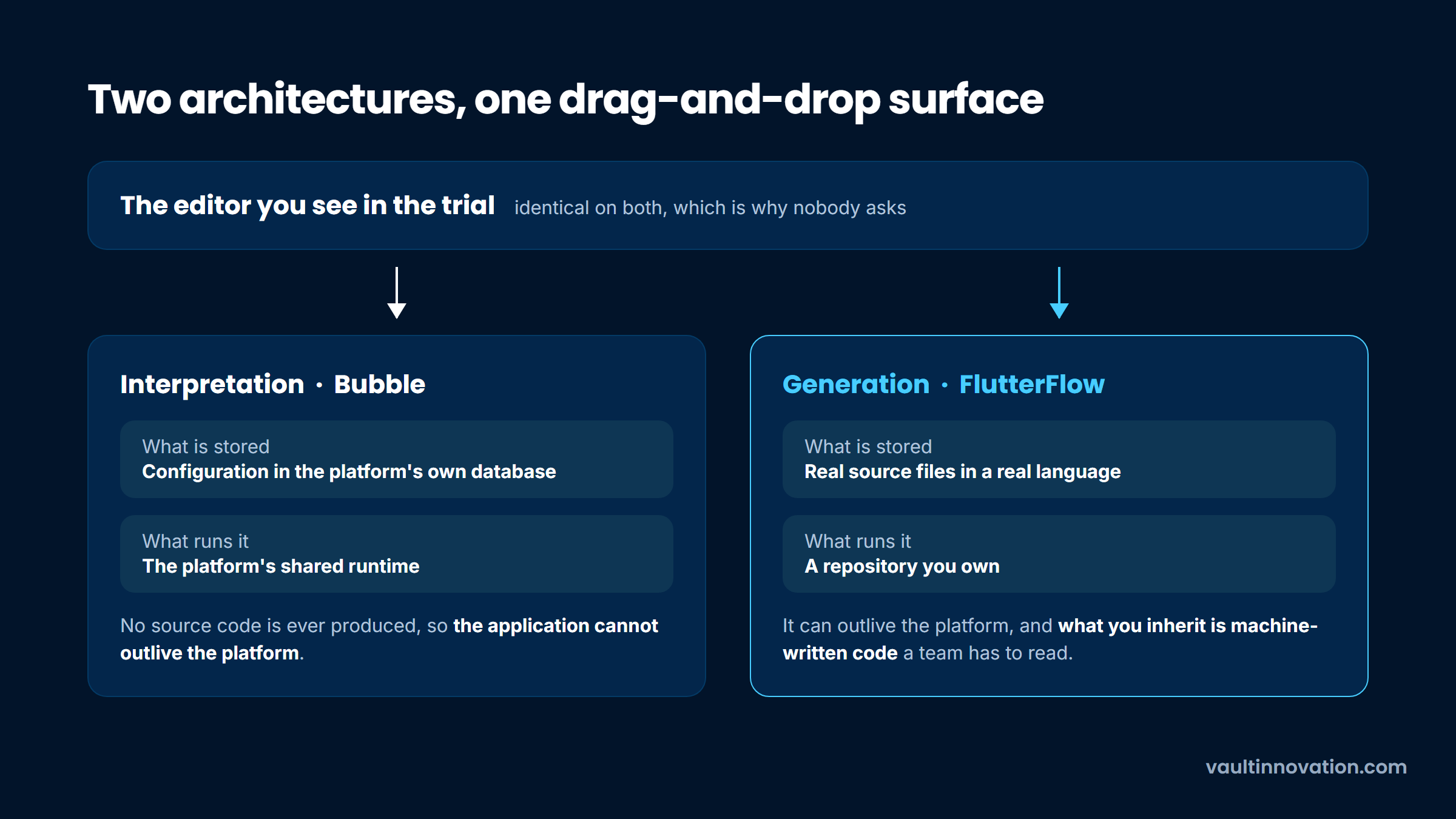
The distinction is invisible while things go well and decisive the moment they do not. Under interpretation, your application cannot outlive its platform. Under generation, it can, though what you inherit is machine-written code that a human team then has to read.
We spend a fair amount of time on the far side of this decision, taking over products whose owners discovered the difference late, and the pattern is consistent: nobody asked the architecture question during the trial, because the demo looks identical either way.
Grouping the market by what a tool actually produces makes the choice tractable, because the categories fail in different places.
| Category | What it produces | Representative tools | Where it stops |
|---|---|---|---|
| Website builders | Marketing sites with a light CMS | Webflow, Framer, Squarespace | No real user accounts, no complex queries |
| Web app builders | Database-backed apps with logic and auth | Bubble, WeWeb | Vendor runtime, metered usage |
| Front ends over a data source | Portals and client apps on a table you already have | Softr, Glide | Inherits the data source's own limits |
| Internal tool builders | Admin panels over existing databases | Retool and similar | Built for staff, not for the public |
| Automation and workflow | Steps between systems you already run | Zapier-class tools | Not an application, no interface of its own |
Most confusion in this category comes from treating the first two rows as one product. They are sold in similar language and priced similarly at the entry tier, and they solve unrelated problems. If your requirement is a fast, well-designed site with a blog, a website builder is the correct answer and the CMS question is the one worth agonizing over, which is the ground our comparison of CMS options covers.
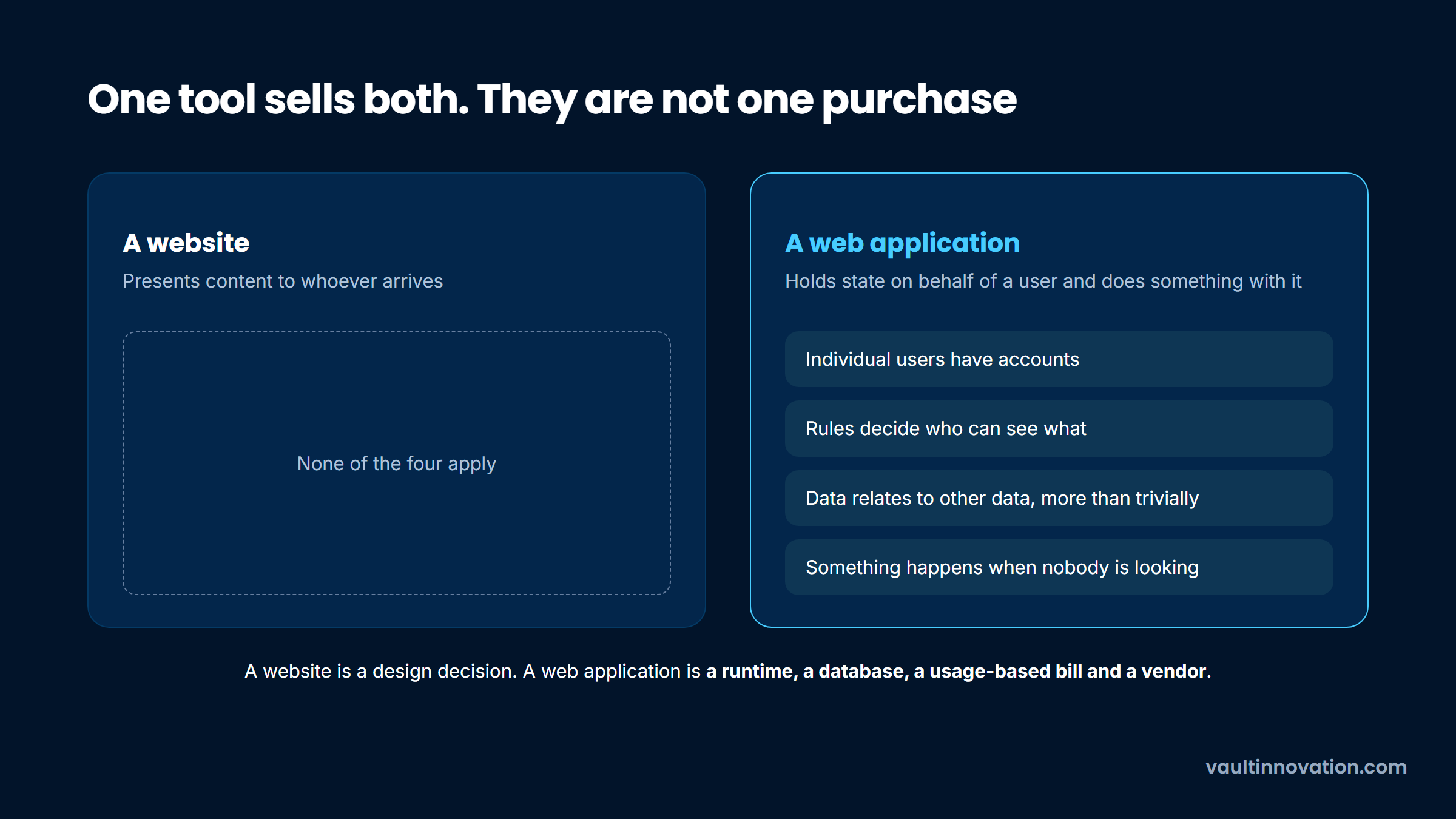
A website presents content. A web application holds state on behalf of a user and does something with it. The line is not stylistic, it is architectural, and it shows up in four concrete places: whether individual users have accounts, whether the system enforces rules about who can see what, whether data relates to other data in more than a trivial way, and whether anything happens when nobody is looking.
Only one of the two purchases has those four parts to build and maintain.
No code website development is a mature, genuinely good option. The tooling is excellent, the output is fast, and the economics are hard to argue with at $15 to $25 a month for a site plan.
No code web application development is a real capability too, but it is a systems decision rather than a design decision. You are choosing a runtime, a database, a pricing model tied to usage, and a vendor. Working out which side of that line your idea sits on is the same exercise as choosing a web or mobile app, and it is worth doing deliberately rather than discovering the answer in month five.
The visual builder is rarely what defeats a project. The data layer is, and unlike the marketing claims, the limits are published.
| Platform | The constraint that binds first | The published figure |
|---|---|---|
| Glide | Rows from spreadsheet sources | 25,000 total across all tables |
| Bubble | Metered server usage, called workload units | 175K/month on Starter, 500K on Team; those plans are $59 and $549 a month for Web and Mobile, billed annually |
| Airtable as a backend | API request ceiling per base | 5 requests per second per base |
Every figure above is published by the vendor itself. Webflow is deliberately absent, because its CMS is a content store rather than an application database, which is a difference in kind rather than a ceiling you can quote.
The editor is almost never the thing you run out of first.
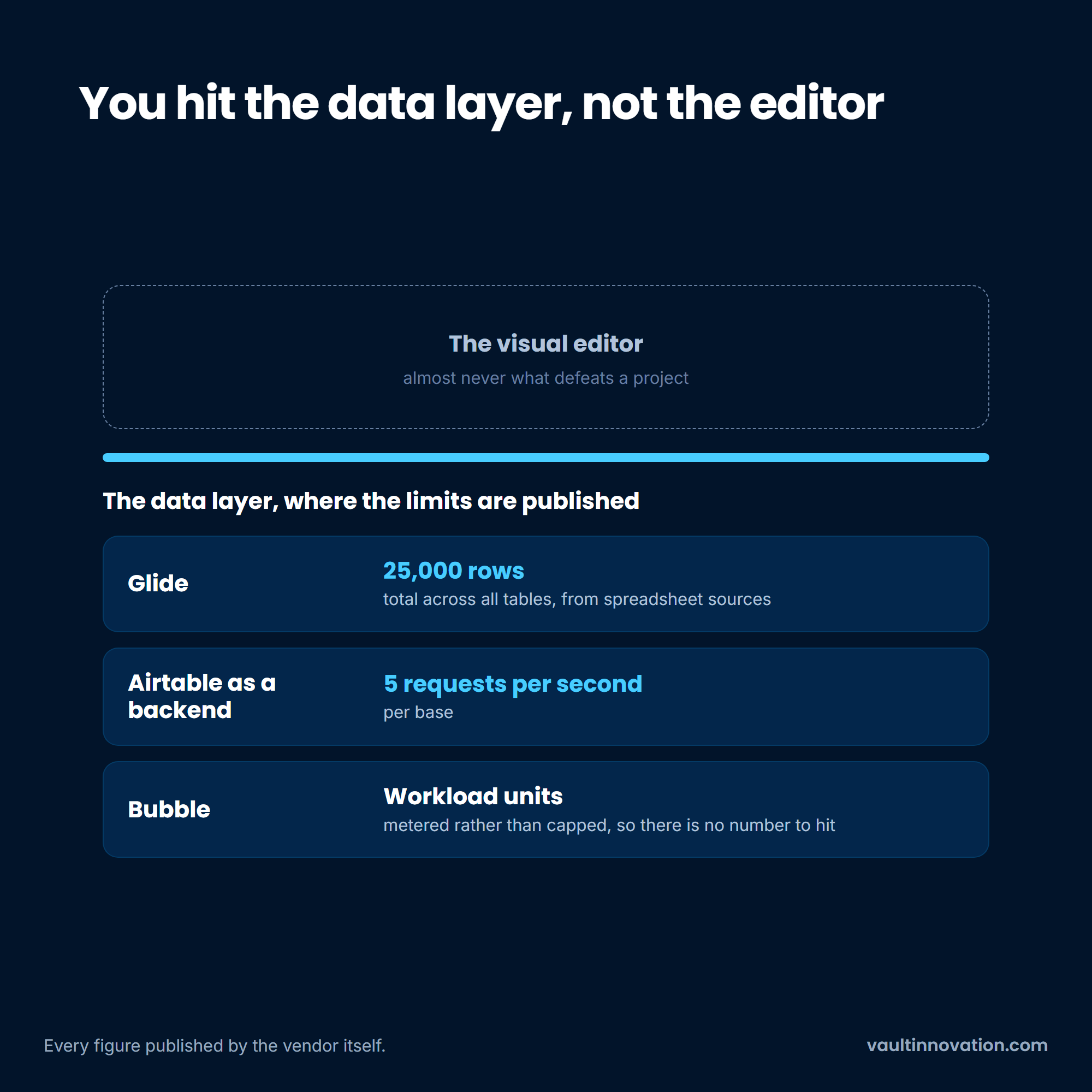
Read the table as a shape rather than a set of numbers. Every platform here converts what would be an engineering constraint into a commercial one, so growth does not break your app, it re-prices it.
Bubble is explicit about this in its own FAQ, describing workload as a single metric that aggregates "the server resources needed to host, run, and scale apps built on Bubble." That is an honest account of a usage-based business model, and it means your infrastructure bill becomes a function of how popular you get. Budget for the tier above the one you need.
This is exactly where we came into Leaf Trade. The system had been built quickly for specific industry needs and could not absorb what the business became: unusually large product catalogs, individual orders far bigger than typical ecommerce assumes, and customers asking for an API so they could wire it into their own systems.
Rebuilding on a framework with its own database was the only route through, and the full case study records how that migration ran with only a few minutes of downtime. The shape of that problem is what to watch for: not a feature the platform lacked, but a data profile it was never designed to hold.
This is the question to ask on day one, and it has a different answer at every vendor. Each position below is taken from the company's own documentation rather than from a review site.
Bubble's position, stated by its co-founder on Bubble's own forum and drawn from its FAQ, is that "Bubble apps can only be run on the Bubble platform; there's no way of exporting your application as code," and that moving off means rebuilding the application logic, though they will help you export the design. Bubble also commits to open-sourcing its platform if it ever shuts down, which is a thoughtful backstop and not the same as portability.
Webflow does offer code export, with two conditions worth knowing before you build. It requires a paid Workspace plan, which is a separate purchase from your Site plan, at $19 or $49 a month. And the export deliberately excludes the dynamic half: CMS, User Accounts and ecommerce content are not included, Collection lists render their empty state, and site search and forms stop working on the exported copy.
FlutterFlow sits at the other end, generating Dart you can push to your own repository. The trade is code quality rather than access, and builders who have taken that route report that generated code reads like generated code.
The quietly strongest position belongs to the tools that never held your data in the first place. Softr and Glide are front ends over a source you connect, so when you build on a database you already control, the interface becomes the disposable part and the data stays yours.
That is a genuine architectural advantage, with one caveat worth reading in Glide's own docs: its table sharing covers basic columns, and computed columns that link to other tables do not come across.
Four vendors, four different answers to what leaves with you.
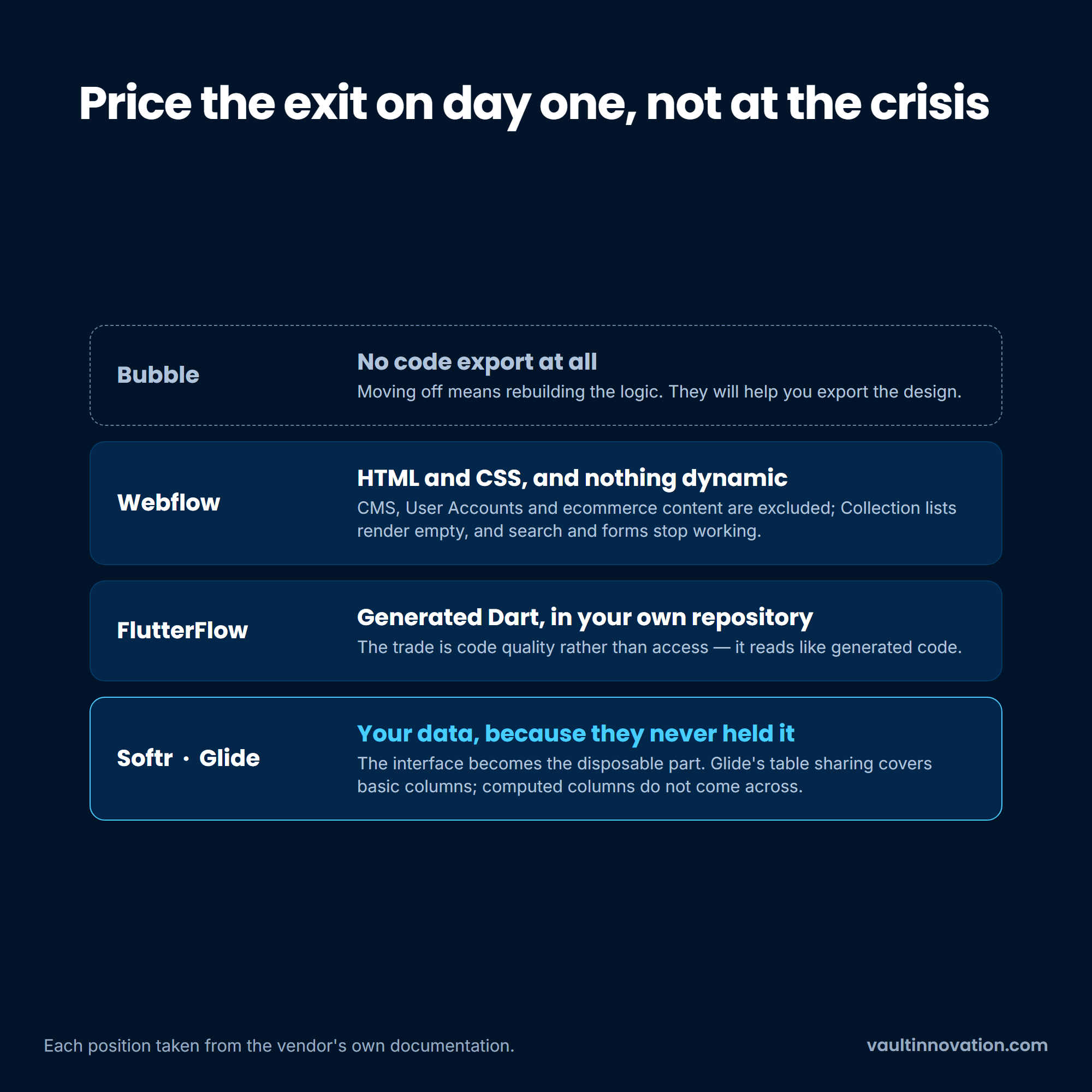
None of this is a reason to avoid the category. It is a reason to know which of those four positions you are signing up for, and to price the exit at the start rather than at the point of crisis. The case for owning what you build outright is a real one with real costs on both sides, which our piece on the benefits of custom software works through honestly.
Vendor risk is not only about code, either. One developer describing a production app built on Bubble explained on Reddit that what pushed them to start replacing the front end with hand-written software was not a technical ceiling at all but a change to Bubble's pricing model. Anecdotal, as forum accounts are, and a useful reminder that the terms of the deal are as changeable as the software.
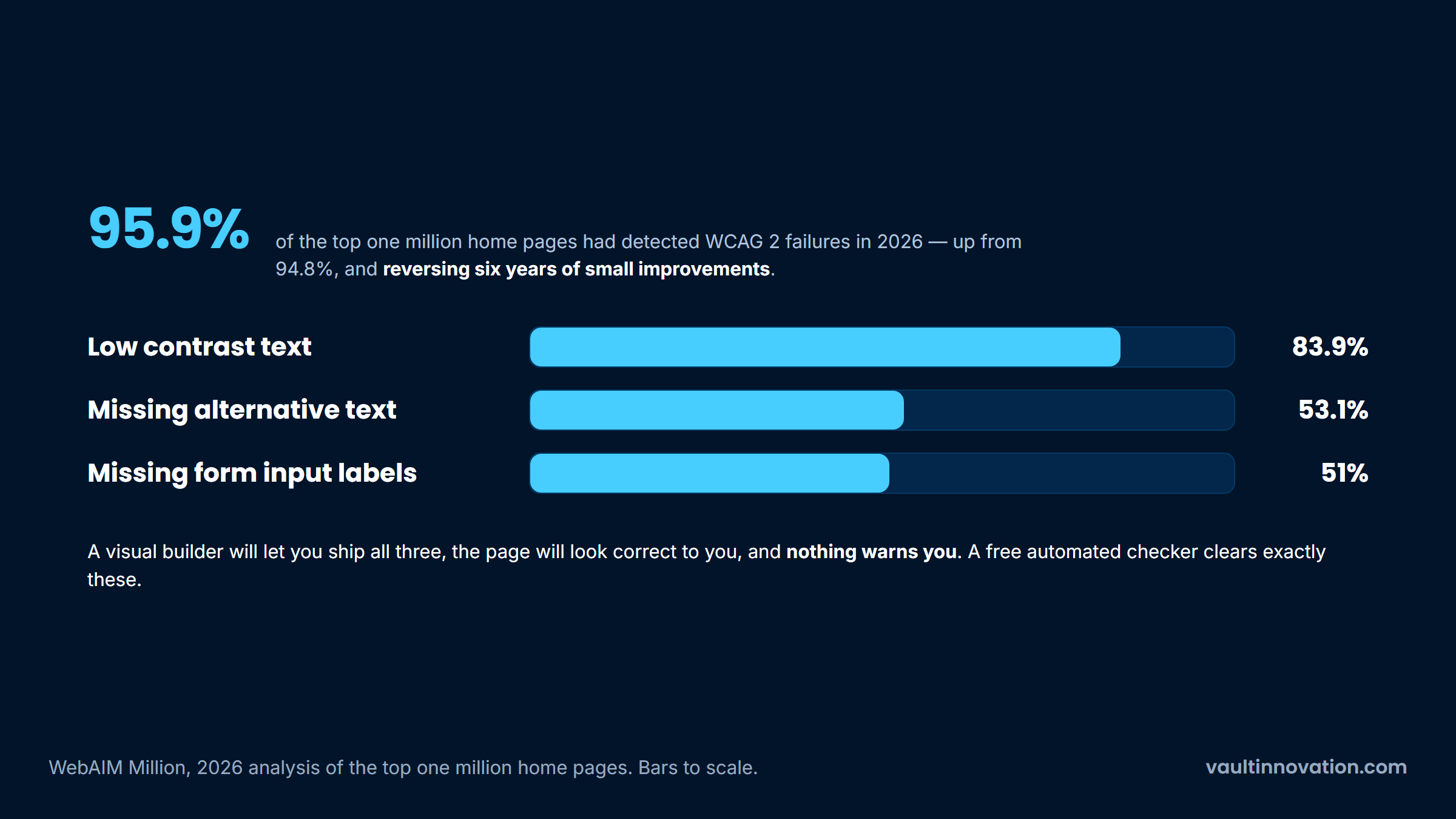
The accessibility state of the web is poor and currently getting worse. WebAIM's annual analysis of the top one million home pages found detected WCAG 2 failures on 95.9% of them in February 2026, up from 94.8% the year before and reversing six years of small improvements, at an average of 56.1 errors per page.
The most common failures are mundane: low contrast text on 83.9% of pages, missing alternative text for images on 53.1%, and missing form input labels on 51%.
Three failures account for most of that, and all three are cheap to fix.
Blaming the builders for that would be convenient, and WebAIM's own data does not support it. The study records site technology alongside the errors, and pages built on the mainstream site builders score better than the web as a whole: Squarespace averaged 33.0 errors and Wix 33.3, both around 40% below the overall average, against WordPress at 52.8. WebAIM's summary is that most pages using a common content management system had fewer errors than average.
What the report does point at is complexity. The average home page carried 1,437 elements in February 2026, a 14.3% rise in a single year, and WebAIM attributes the deterioration to heavier reliance on third-party frameworks and libraries and to AI-assisted coding.
So the problem is not that a visual builder writes worse markup than a developer would. It is that no tool, visual or otherwise, stops you setting light gray text on a white background, leaving every image without a description, or shipping a contact form whose fields carry no labels. Nothing warns you, the page looks correct to you, and a screen reader user cannot complete the form.
That is worth a deliberate check before launch whatever the site was built in, and it is one of the few quality problems in this category sitting entirely within your control. Run the page through a free automated checker, then fix the contrast, add the image descriptions and label the form fields. That clears the three failures WebAIM finds most often.
Prompt-driven builders and coding agents belong in this article because readers searching the term increasingly have them in mind, and because they answer the architecture question in a way none of the platforms above do.
Recall the split between interpretation and generation. An interpreting platform never produces your source code, because there is none to produce. A generating platform writes real files you can take away. An agent is the far end of generation: what it hands over is an ordinary codebase in an ordinary framework, with no vendor runtime beneath it and nothing to export, because it was never inside anything.
That removes the entire class of problem described above. There is no workload meter, no plan tier gating the feature you need, no FAQ ruling out code export, and no question about what happens if the vendor changes the deal.
What replaces it is a different problem, and the swap is not obviously in your favor. A hosted platform is accountable for the runtime, the patching and the uptime, and it answers the phone when those fail.
A generated codebase makes all of that yours from the first day, including the parts nobody has read. So the real comparison is not an agent against a platform. It is an agent against the cost of operating software, which is what these platforms were selling the whole time.
The criticism in this article is about limits rather than worth, and there are jobs where no code web development is straightforwardly the right answer.
Marketing sites are the clearest case. The economics are unarguable and the output quality is high. Internal tools are the second: an operations dashboard used by nine people has no scale problem, no App Store, and a forgiving audience, and building it in a weekend instead of a quarter is a genuine win.
The third is validation, and it is the one most underused. Putting a rough working version in front of real users answers questions no amount of discussion will, and doing that for a few hundred dollars before committing to a build is simply good practice. That is the same argument we make about validating an app idea before writing code, and no code tools are an excellent instrument for it.
There is also a serious middle path that gets ignored because it suits neither sales pitch. Experienced builders pair a visual front end with a real backend service rather than relying on one platform for both.
One long-running discussion on Reddit argues that the well-known no code ceiling is largely a mobile phenomenon, and that production web apps are quite achievable once a site builder sits in front of a proper database service. Anecdotal, but it matches what these architectures look like in practice: two vendors with genuine integration work between them, which is a fair description of most working no code web applications at any real scale.
Four requirements reliably break a no code build, and they are worth checking your idea against before you start.
A two-sided marketplace manages to require all four at once, which is why building a marketplace is the classic project that looks achievable in a visual tool right up until the second user type needs its own permissions and its own payout logic. If none of the four applies to what you are building, the tooling in this category will probably carry you a long way.
No code software development is not a lesser form of engineering and it is not a shortcut past it. It is a set of tools with published limits, sold by vendors whose business model is hosting your product, and it does several jobs better than a custom build ever will.
The decision gets much easier once you stop asking whether no code software development is good and start asking what you are building, who it serves, and what happens to it if the vendor changes the deal. A marketing site, an internal dashboard and a prototype are all excellent answers.
A system your business runs on is a different question, and it earns an architecture conversation rather than a trial signup. That conversation is most of what our development team does before anyone writes anything.
It is a platform that lets you assemble working software through a visual editor and configuration rather than by writing and deploying code, and then runs the result on its own infrastructure. The category spans website builders, app builders, front ends over an existing data source, internal tool builders, and automation tools, and those five solve genuinely different problems.
Not the code, which still exists and was written by the platform's engineers. What no code development removes is the requirement that you write, deploy, secure and operate an application yourself. That is worth a great deal, and it is the reason the ongoing relationship with the vendor matters as much as the builder does.
Yes, within limits you should read first. No code web application development handles user accounts, forms, dashboards, payments and moderate data volumes well. It struggles with complex relational queries, background jobs, real-time behavior across many users, and permission rules with real depth to them, and pricing is usually metered against usage rather than fixed.
Not inherently. Modern builders output reasonable markup and fast pages, and no code website development is a mainstream choice: W3Techs put Wix on 4.2% of all websites and Webflow on 0.8% in September 2026, against WordPress at 40.2%. The genuine risks are accessibility defects, which these tools generate silently, and being locked into a rendering model you cannot change later.
Watch three signals rather than a size threshold: your usage bill is growing faster than your revenue, you are maintaining workarounds for things the platform will not do, and a requirement you cannot defer has no path at all on your current stack. Any one of those is a prompt to price the alternative.
Our interest here is not hidden: we are a custom development team, and we get paid when the answer is to build it properly. So the useful thing we can offer is not a verdict but a reading, of which limits in this article your idea actually meets and how soon it meets them. That is a conversation worth having early rather than after the first rebuild. Contact us and describe what you are trying to build.


