Blog

Key takeaways:
Every guide to custom CRM development opens by telling you that off-the-shelf software can't handle your unique business. Most of the time that's a sales pitch, not a diagnosis.
Here's the more useful version. A custom CRM is one of the most expensive pieces of software a mid-sized company can commission, and it's also one of the easiest to justify badly. The same features get rebuilt from scratch for the fourth time in a decade because someone found the existing tool annoying.
So this guide covers how to build a custom CRM properly, and it spends the first half on whether you should. Read it and you will be able to name which of the three real options fits your situation, what each one costs to run for five years, and what would have to be true for a from-scratch build to be the right answer.
The phrase covers two very different things, and conflating them is where most budgets go wrong.
A customizable CRM is a commercial platform you reshape: custom fields, custom objects, workflow rules, your own automations, maybe a few scripts. Salesforce, HubSpot, Zoho and Dynamics all work this way. You're configuring someone else's product, and their release notes are your roadmap.
A custom CRM is software you own outright. Your database schema, your permissions model, your interface, your hosting bill, your security patches. Nothing updates unless you pay someone to update it.
Side by side, the two readings differ on every row that costs money.
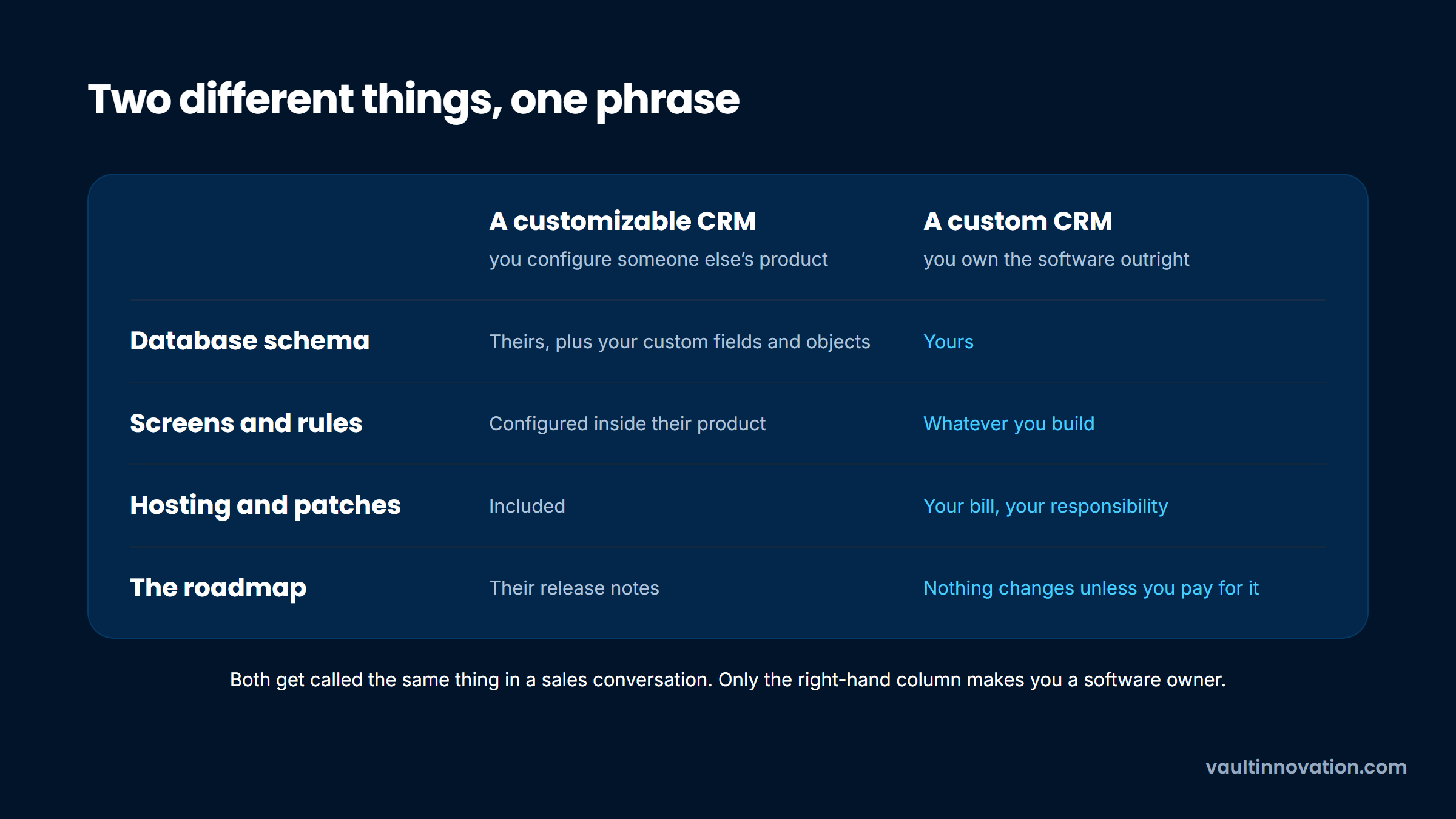
Both get called the same thing in sales conversations. Only the second one makes you a software owner, with everything that implies about maintenance, staffing and long-term cost. When a vendor says they'll build your custom CRM, ask which of the two they mean before you look at a number.
Almost nobody arrives at this question from a blank page. There's usually a specific, recent frustration driving it, and the frustration is worth naming precisely because it predicts whether building will actually help.
The most common trigger is a workflow the platform genuinely can't model. A logistics company routing loads against driver hours, a clinic managing referrals across three provider networks, a wholesaler pricing per-customer contract rates. These are real modeling problems, and they're the strongest argument for custom work.
The second most common trigger is a per-seat bill that grew faster than the value. At 200 users, a $150-per-seat platform costs $360,000 a year, and building starts to look cheap by comparison. It usually isn't, for reasons we'll get to, but the arithmetic is what starts the conversation.
The third trigger is the weakest, and it's the one that shows up most: the current system is unpleasant and nobody uses it properly. That's an adoption problem wearing a technology costume. Before commissioning anything, it's worth watching how your team works, because a rebuilt version of a tool nobody wanted is still a tool nobody wants.
We build custom software at VAULT, so treat this section as the argument we'd make against ourselves before quoting anyone.
When you build, you don't buy a system. You adopt one. Every dependency you pull in has a security lifecycle, every integration breaks when the other side ships a change, and every engineer who leaves takes context with them.
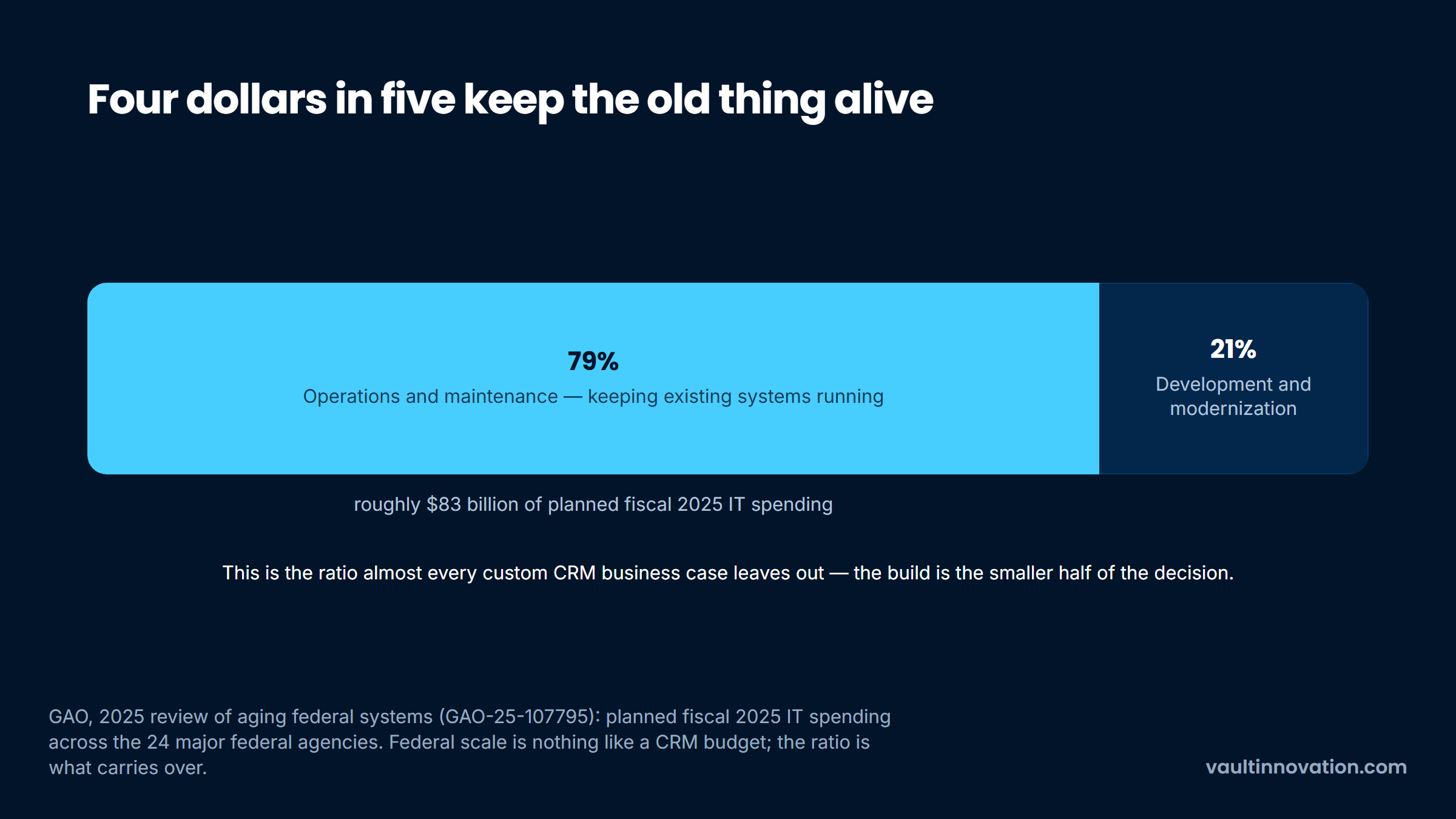
The clearest public evidence of what that costs at scale comes from federal IT. In its 2025 review of aging government systems, the GAO reported that about 79% of planned fiscal 2025 IT spending across the 24 major federal agencies, roughly $83 billion, went to operations and maintenance rather than development or modernization.
The same review scored 69 federal legacy systems and named the eleven most in need of modernization. Those eleven run from about 23 to 60 years old and cost roughly $754 million a year just to keep running.
Federal systems are not your CRM, and the scale is absurd by comparison. The ratio is the point. Roughly four dollars in five went to keeping software alive rather than making it better, and that is the line item almost every custom CRM business case leaves out.
Drawn as one budget, that split is hard to argue with.
There's a quieter version of the same problem. Five years in, the people who made the original design decisions have moved on, the documentation is stale, and a change that should take a day takes three weeks. That's the moment teams start asking whether to rebuild or improve what exists, which is the same decision they made the first time, now with more constraints.
Four conditions justify building. Roughly speaking, you want at least two before this becomes the right call.
The first is a workflow that is your actual competitive advantage. If how you route, price or match is the reason customers pick you, encoding it in someone else's object model is a real constraint.
The second is scale that inverts the math and stays inverted. Per-seat pricing punishes large, low-intensity user bases, and if you have 300 occasional users, a platform bill can exceed a build within three years.
The third is a compliance or data-residency requirement no vendor will meet. This is rarer than people think, because the major platforms hold most certifications you'd need, but it does happen in defense, health data and some regulated financial contexts.
The fourth is that the CRM is the product. If you're planning to sell it, you're not building an internal tool, you're building software for a market, and that changes everything about how it should be scoped.
Between "configure Salesforce" and "build from scratch" sits the option that fits most companies, and it barely gets discussed because nobody sells it as a package.
Keep a commercial platform for the parts every business shares: contacts, companies, deals, activity history, email sync, permissions, mobile access, audit logs. Those are solved problems, and rebuilding them is how six-figure budgets evaporate before you touch anything distinctive.
Then build custom software only around the workflow that is genuinely yours, and connect the two through the platform's API. You own the part that matters and rent the part that doesn't. This is where custom development pays for itself, because every dollar goes into the logic no vendor ships.
One system, split at the seam where ownership actually earns something.

Practitioners reach the same conclusion independently. In a thread about custom CRM cost on Reddit, one commenter priced a fairly basic build at "$20k+ easy" and noted the requester could buy equivalent off-the-shelf software for around $97 a month.
Another suggested starting from an open-source base like SuiteCRM or vTiger, which supplies roles, permissions and contact objects for free. Those replies are anecdotal rather than survey data, but they match what we hear in scoping calls.
There's no useful single number, so here is what actually moves it. Every row below changes the total by a meaningful multiple, not a rounding error.
| Cost driver | Modest version | Expensive version | What it changes about the build |
|---|---|---|---|
| User roles | 1 to 2 | 5 or more | Each role multiplies screens, permission rules and test paths |
| Integrations | Email and calendar | ERP, billing, telephony, data warehouse | Every integration has its own auth, rate limits and failure modes |
| Data migration | A clean export under 50,000 records | Multiple legacy sources, no shared keys | Reconciling records across systems is skilled, slow work |
| Reporting | Standard lists and filters | Custom dashboards, cohorts, forecasting | Reporting requirements quietly reshape the entire data model |
| Compliance | None | HIPAA, SOC 2, audit trails | Adds engineering, documentation and external audit cost |
| Mobile | Responsive web | Native iOS and Android | Two more builds and two more release processes |
Those drivers compound rather than add, which is why two projects described in the same sentence can differ fivefold. A two-role CRM with one integration and a clean import is a genuinely small project. The same CRM with five roles, four integrations and a messy migration is a different animal entirely.
For a market reference point, our Clutch listing shows an hourly band of $150 to $199 and a project floor of $10,000. Offshore shops price well under that and large consultancies well over it, so identical scope can carry wildly different totals depending on who builds it.
Rate alone is a poor predictor, though. A team that scopes custom CRM software development tightly at $175 an hour will usually cost less in total than a cheaper team that bills twice the hours, which is why we quote against a defined scope through our custom development practice rather than publishing a rate card.
The sequence below is the one we run, and the order matters more than any individual step. Most failed builds skipped step two or step six.
Step four is where the most money gets saved, and it's the step teams most want to skip. Scope grows in proportion to how long you spend planning without shipping, which is why an iterative approach almost every time on this kind of build.
Ask a team what worries them about a CRM build and they'll say features. Ask them six months later what went wrong and they'll say the data.
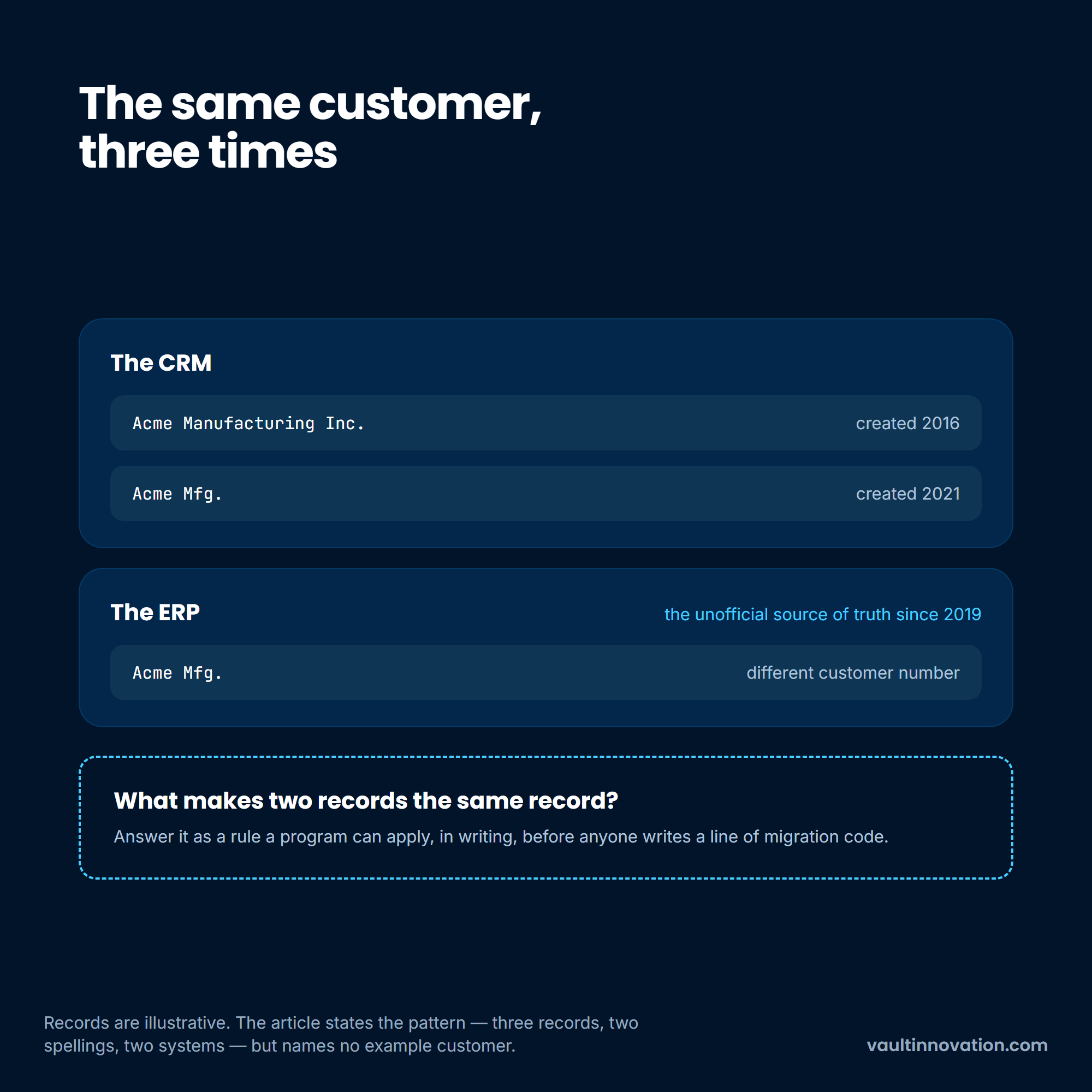
The problem is rarely volume. It's that the same customer exists three times under two spellings across two systems, one of which has been the unofficial source of truth since 2019. Nothing in a project plan prepares you for how long reconciling that takes.
This is what a reconciliation problem looks like before anyone has written a rule for it.
We ran a version of this for Nationwide Transfer, where the work was transforming raw records into usable leads at scale. That project moved 28 million records, and the engineering effort sat in the mapping and validation rules rather than the transfer itself. The full record-transformation build is documented on our site, and the lesson generalizes: migration is a data-modeling project wearing a logistics costume.
Before anyone writes migration code, get these answers in writing:
Answer those five and migration becomes a scheduling problem. Skip them and it becomes the reason the launch slips two quarters, which is the most common single cause of these projects landing late.
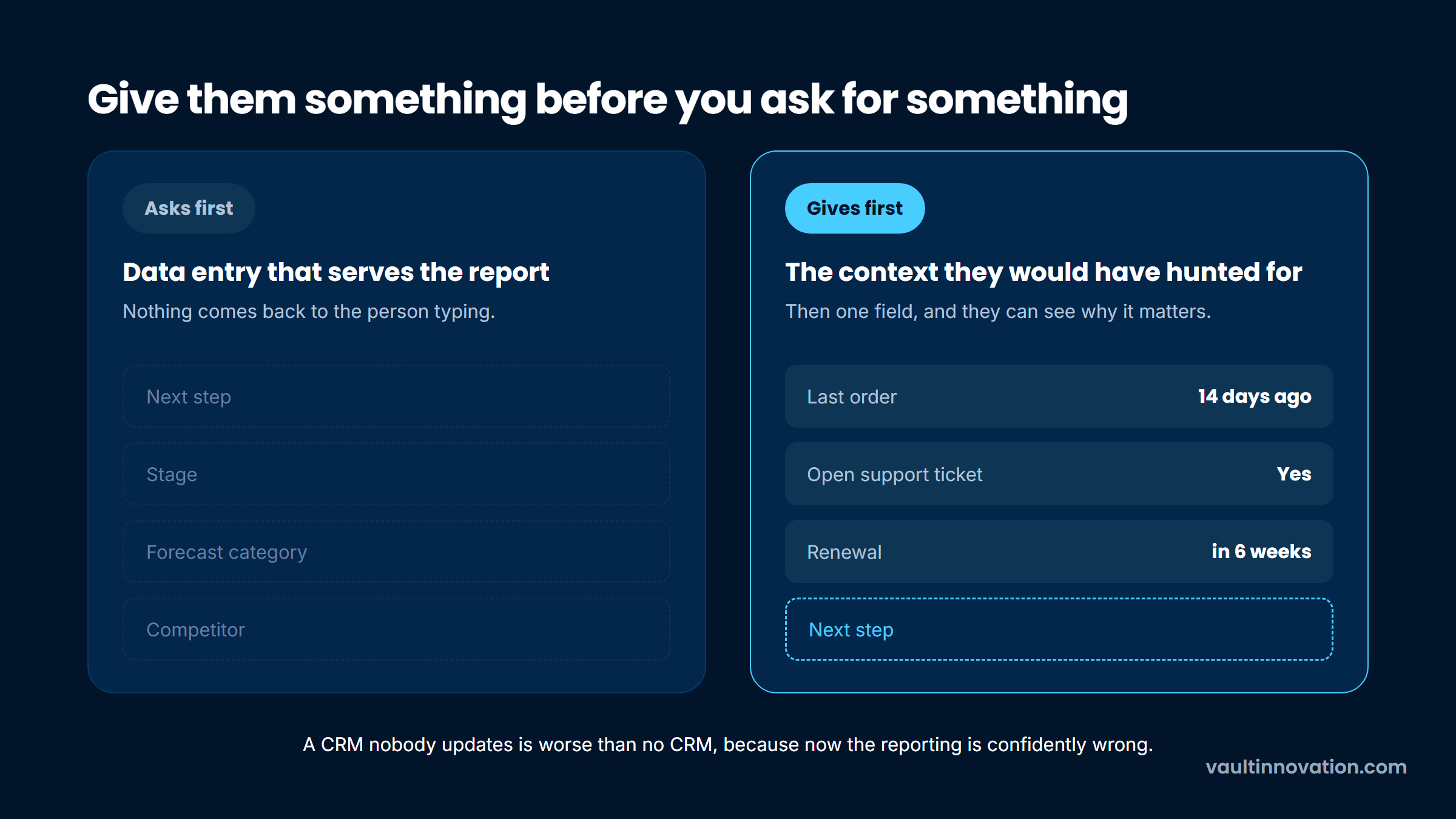
A CRM nobody updates is worse than no CRM, because now your reporting is confidently wrong. Custom CRM adoption is a design problem you solve during the build, not a training problem you solve afterward.
The research supports treating it structurally. A peer-reviewed study in PLOS ONE surveyed 420 small and mid-sized firms, analyzed 331 completed responses with structural equation modeling, and found top management support and perceived relative advantage among the significant determinants of adoption, with firm size moderating several of those relationships.
In plain terms: whether leadership visibly uses the system, and whether it is obviously better than the spreadsheet it replaced, predict adoption more reliably than feature count does.
That has direct design consequences. Every screen a salesperson sees should give them something before it asks them for something, which usually means surfacing context they'd otherwise hunt for. Data entry that only serves management reporting is the fastest way to lose the room.
The same field, on a screen that earns it and on one that does not.
Designing for adoption also means measuring it from day one rather than assuming it. Track the share of active users updating records weekly and the share of deals with a current next step. Both are cheap to instrument and both fall before revenue does. The same pattern shows up in AI rollouts that fail rather than on technology, and the fix is the same one: design for the person doing the typing.
The build quote is the smaller half of the decision. Here's the shape of what follows, expressed as a share of the original build cost per year.
| Ongoing cost | Typical annual range | What it covers |
|---|---|---|
| Maintenance and dependency upgrades | 15% to 25% of build cost | Library updates, security patches, breakage from third-party API changes |
| Hosting and infrastructure | $3,000 to $40,000 | Servers, database, backups, monitoring, scaling headroom |
| Enhancements | 20% to 40% of build cost | The changes the business asks for once it starts using the thing |
| Support | Varies with users | Someone to call when a permission breaks on a Friday |
| Security and compliance | $5,000 upward | Reviews, penetration testing, audit evidence if you're regulated |
Add those up and a $200,000 build commonly carries $70,000 to $120,000 a year behind it. Run that for five years and the honest comparison is not $200,000 against a platform subscription, it's roughly $600,000 against a platform subscription. That comparison changes a lot of minds, and it should, because it's the real one.
Score your situation against the four conditions from earlier: a workflow that is genuinely your advantage, scale that inverts the per-seat math, a compliance requirement no vendor meets, and a plan to sell the software.
Two or more, and a build deserves serious scoping. Exactly one, and the middle path is almost certainly your answer: platform for the common objects, custom software for the workflow that earns you money. Zero, and your problem is process or adoption, and buying the most configurable platform you can tolerate will serve you better and faster.
Then pressure-test the answer with a cost model that runs five years, not one, and includes the ownership rows above. If the build still wins on a five-year view with maintenance included, you have a real case. If it only wins in year one, you found a financing preference, not an engineering decision.
Whichever way it lands, run a paid discovery phase before committing to a build. It produces a scope, a data model and a defensible number, and it's the cheapest way to find out that you needed something smaller.
If you'd like a second opinion on which of the three options fits your situation, talk to our team. We'll work through it with you, including the cases where we'd tell you not to build, because the honest answer here is a platform more often than you'd expect from a firm that bills for builds.
There's no honest single figure, but the shape is predictable. A narrow, two-role CRM with one integration and a clean data import is a genuinely small project. Add five roles, four integrations, custom reporting and a messy migration and you're into a multiple of that, because those drivers compound rather than add.
The more useful question is what it costs to own. Budget 15% to 25% of the build cost annually for maintenance alone, before enhancements, and model five years rather than one. Most build-versus-buy comparisons look decisive until that second number goes in, and then they often reverse.
A focused first version covering a few workflows for one team is typically a matter of months, not weeks. A full replacement across departments, with several integrations and a migration from more than one legacy source, runs considerably longer and is usually best split into phases.
The variable that moves the timeline most isn't engineering speed, it's decision speed. Projects stall waiting for someone to rule on which system owns a field, so name that decision-maker before the build starts.
Customize by default, and build only where customization genuinely can't reach. The major platforms handle contacts, pipeline, permissions, email sync and mobile access well enough that rebuilding them is rarely a good use of budget.
Reserve a from-scratch build for the workflow that is actually your competitive advantage, and connect it to a commercial platform through its API. That hybrid is the answer for most companies who start this conversation, even though almost nobody sells it that way.
Two causes dominate, and neither is technical. The first is that nobody agreed on the process before it got encoded in software, so the build ends up automating a disagreement. The second is data: legacy records that don't reconcile, discovered too late to fix inside the budget.
Adoption is the third. A system that asks users for information without giving them anything back gets filled in badly or not at all, and the reporting built on top of it becomes actively misleading.
Partially, and it's a reasonable place to start. No-code and low-code platforms can produce a working internal CRM covering contacts, pipeline stages and basic automation, and for a small team that may be all you ever need.
The limits show up around performance at volume, complex permissions, and integrations that need custom authentication or error handling. A common and sensible path is to prove the workflow on a no-code build, then rebuild the parts that hit those limits once you know the process is right.
Run the four conditions, then model five years with the ownership rows included. That one exercise separates a genuine engineering case from a financing preference, and it costs an afternoon rather than a discovery budget.
If you want a second set of eyes on the model before the number reaches a board, contact us.